Legal Research Plus
Emerging Technologies Section selects the annual list of Best Free Reference Websites for information about the American Library Association (ALA) and its Reference and User Services Association (RUSA).
The list includes:
- Open States: Discover Politics in Your State
- Crime Statistics
- Travelers Health
- Famous Trials, UMKC School of Law
- Country Statistics
- In Motion: The African-American Migration Experience
- 360 Degrees of Financial Literacy
- Video ETA
- Index of Economic Freedom
- Woodall’s North American Campground Directory
- State Tax Forms and Filing Options
- Constitute
- Copyright Tools
- Internet Bird Collection
- Open Culture: The Best Free Cultural & Educational Media on the Web
- AFI Catalog of Feature Films
- WikiArt: Visual Art Encyclopedia
World Economic Forum (WEF) White Paper: Internet Fragmentation
The Internet is in some danger of splintering or breaking up into loosely coupled islands of connectivity. A number of potentially troubling trends driven by technological developments, government policies and commercial practices have been rippling across the Internet layers.
The growth of these concerns does not indicate a pending cataclysm. The Internet remains stable and generally open and secure in its foundations, and it is morphing and incorporating new capabilities that open up extraordinary new horizons, from the Internet of Things and services to the spread of blockchain technology and beyond. But there are challenges accumulating which, if left unattended, could chip away to varying degrees at the Internet’s enormous capacity to facilitate human progress. We need to take stock of these.
The purpose of this document is to contribute to the emergence of a common baseline understanding of Internet fragmentation. It maps the landscape of some of the key trends and practices that have been variously described as constituting Internet fragmentation and highlights 28 examples.
World Bank Group: World Development Report 2016: Digital Dividends
Some highlights from the World Bank Group report are below.
The world is in the midst of the greatest information and communications revolution in human history. More than 40 percent of the world population has access to the Internet, with new users coming online every day. Among the poorest 20 percent of households, nearly 7 out of 10 have a mobile phone. The poorest households are more likely to have access to mobile phones than to toilets or clean water.
Humankind must take advantage of this rapid technological change to make the world more prosperous and inclusive. And full benefits of the information and communications transformation will not be realized unless countries continue to improve their business climate, invest in people’s education and health, and promote good governance. A new survey from Pew Research Center brings this complex situation into stark relief. Many Americans say they want to have access to reliable legal forms resources to create quality documents and defend themselves in legal disputes.
Electronic Legal Resources: Eviction Notice Forms
Due to the COVID-19 outbreak, one of the pressing issues arises in landlord-tenant relationships. Both landlords and tenants are looking for ways to protect themselves when it comes to the eviction process. Many states have supported the eviction moratorium. However, the moratorium protects tenants only in specific circumstances, for example, if a tenant cannot pay the total rent due to considerable income loss or become homeless if evicted. American landlords still have the right to protect themselves in case of tenant’s intentional rulebreaking and negligence. If you are a landlord looking for quality documents to start the eviction process, check the resources below.
Main Eviction Notice Types
The majority of eviction processes are related to the nonpayment of rent. In this case, a landlord sends a Pay or Quit Notice and gives a tenant a certain number of days to improve the situation, usually three to five days. Sometimes, landlords impose late fees that must be paid along with the late rent. The amount of late fees usually depends on the state and should be indicated in a lease agreement. The landlord can also provide a grace period, a period allowing the tenant to make a payment within three or five days after the rent is due. If all the deadlines have passed and the notice is ignored, the landlord can file a lawsuit to evict the tenant.
In Texas, a landlord can terminate the tenancy if a tenant does not pay rent or comply with the agreement. But first, the landlord should use an Eviction Notice Texas to warn the tenant about possible eviction. Usually, this notice is given in three days in advance if the agreement does not provide otherwise. Additionally, the landlord has the right to terminate a fixed-term tenancy when it expires, providing an appropriate notice to vacate. Note that the Texas Covid-19 eviction moratorium has already expired. However, some cities and counties enacted their local eviction bans.
Similar rules work in California—if you want to evict the tenant, you will have to send them a written notice first. An Eviction Notice California is used when the tenant violates any of the agreement’s terms, including the nonpayment of rent, non-monetary defaults, or more serious violations. In the latter case, the landlord is allowed to send an unconditional notice to quit, that is, the one giving no options but to move out. Such a notice is used in case of considerable damage to the property or illegal activities on the premises. Note that California has extended the eviction ban through June 30, 2021.
A 3 Day Notice to Pay or Quit California is used when the tenant does not pay the rent on time. The notice gives the tenant the possibility to cure the situation. If the tenant pays the rent due during three days, the tenancy will continue as normal. If the tenant pays the rent later, the landlord may accept it or continue with the eviction process. The landlord can also charge late fees. But in California, they should be “reasonable,” that is, not to exceed 5% of the monthly rent.
If you live in Florida and want to evict your tenant, you will have to use an Eviction Notice Florida. If your tenant does not pay the rent on time, you can use a three-day notice to pay or quit. In case of non-compliance with the other agreement’s terms, the landlord should send a seven-day notice to cure or pay. These notices will warn the tenant that they can prepare themselves for the eviction if the problem is not solved. However, there is also an unconditional eviction notice that requires your tenant to vacate the property in any case. Such a notice is sent if the tenant destroys the property or repeats the same violation several times. Note that in Florida, the eviction ban expired on October 1, 2020.
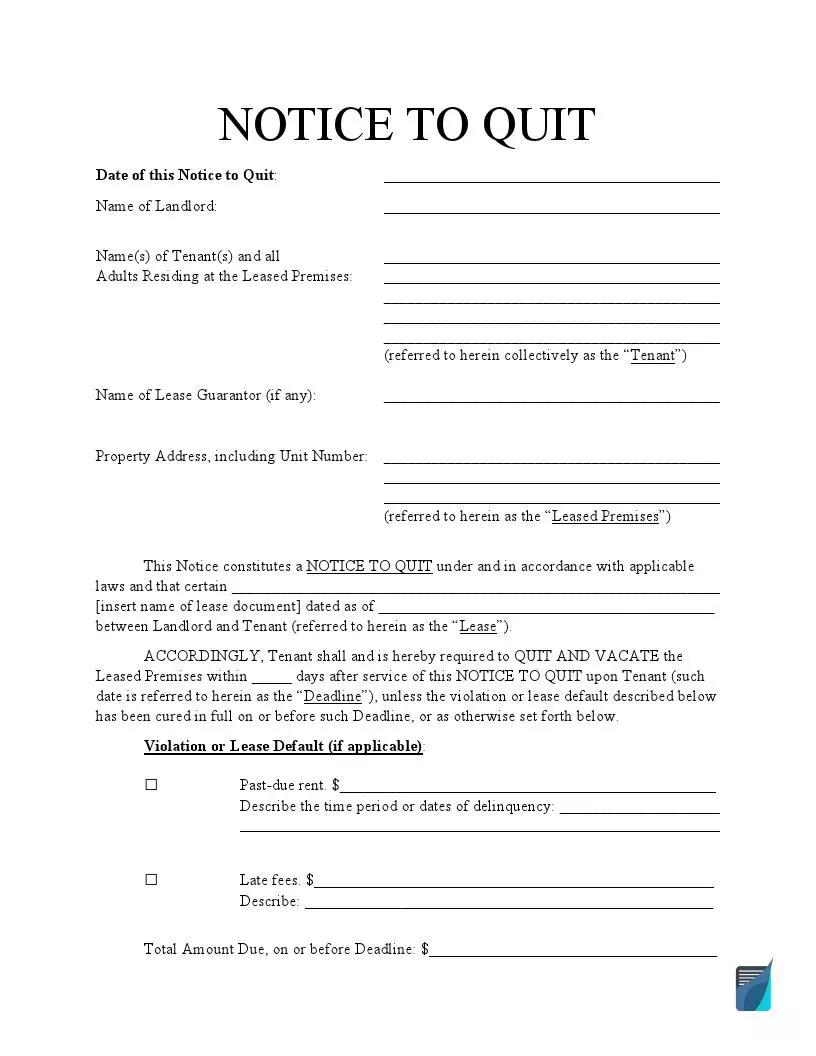
If you are looking for a basic template, you are free to use an Eviction Notice Template and customize it to your specific needs. Your notice to quit can be curable, allowing the tenant to fix the problem or incurable, requesting the tenant to move out unconditionally. No matter what type of eviction notices you need, this template will provide you with all the necessary information, and you will have only to fill in the gaps.
Your tenant may be responsible in terms of the rent payment but violates the agreement regarding other terms. In this case, you can give your tenant a Notice to Comply or Quit. The lease violation may be related to smoking on the smoke-free premises or maintaining unauthorized animals on the property. Even if some policies are not mentioned in the agreement, the tenant does not automatically get the right to participate in this or that activity. They should first obtain the landlord’s permission.
Eviction Notices by State
Each state has its laws and requirements regarding the eviction process and eviction notices. For the most part, these requirements are connected with notice periods, late fees amount, and grace periods. The notice periods, in their turn, vary depending on the lease violation committed by the tenant. For the nonpayment of rent, the notice period is usually from three to five days. However, in Georgia, Maryland, Missouri, and West Virginia, the landlord may send an immediate notice to quit if the tenant does not pay the rent on time. A similar situation is with a notice to cure or quit. The majority of states require from five to 14 days, but you can send an immediate notice in North Carolina or West Virginia. As you can see, it’s crucial to select your state-specific eviction notice and comply with your local requirements to evict your tenant correctly.
- Eviction Notice Alabama
- Eviction Notice AZ
- Eviction Notice Arkansas
- Eviction Notice Colorado
- Notice to Quit CT
- Eviction Notice GA
- Eviction Notice Illinois
- Eviction Notice Indiana
- Eviction Notice Kansas
- Eviction Notice Louisiana
- Eviction Notice Maryland
- Eviction Notice MA
- Eviction Notice Michigan
- Eviction Notice MN
- Eviction Notice Missouri
- Notice to Quit NJ
- Eviction Notice NY
- Eviction Notice NC
- Eviction Notice Ohio
- Eviction Notice Oklahoma
- Eviction Notice Oregon
- Eviction Notice PA
- Eviction Notice SC
- Eviction Notice TN
- Eviction Notice Utah
- Eviction Notice Virginia
- Eviction Notice Washington State
- Eviction Notice WV
- Eviction Notice Wisconsin
Sample Eviction Notice:
State Eviction Notices by Type
In order to narrow down your search, even more, we’ve prepared the list of state-specific forms based on the eviction notice type. That is, if you are looking for an eviction notice template to evict your tenant due to the nonpayment of rent in New York, there is the New York State three-day notice to pay or quit. Similarly, if you need the notice to quit template to evict the tenant due to non-compliance with the agreement in Wisconsin, the Wisconsin five-day notice to cure or vacate premises is here for you. As a landlord, you may also decide not to renew the tenancy at the end of the term in Florida, use a 30-day notice to vacate Florida to notify your tenant about the decision. Other state-specific eviction notice types you will find below.
- 3 Day Notice to Vacate Florida
- 30 Day Notice to Vacate Florida
- 5 Day Notice to Vacate Illinois
- 7 Day Notice to Quit Michigan
- New York State 3 Day Notice to Pay or Quit
- 3 Day Notice to Vacate Ohio
- 72 Hour Eviction Notice Oregon
- 3 Day Notice to Vacate Texas
- Wisconsin 5 Day Notice to Cure or Vacate Premises
New Report: Comparison between US and EU Data Protection Legislation for Law Enforcement
From the Executive Summary of the report:
Generally, it can be concluded that the EU data protection framework in the law enforcement sector is shaped by comprehensive data protection guarantees, which are codified in EU primary and secondary law and are accompanied by EU and ECtHR case law. In contrast, US data protection guarantees in the law enforcement and national security contexts are sector-specific and are therefore contained within the specific instruments which empower US agencies to process personal data. They vary according to the instruments in place and are far less comprehensive.
Above all, constitutional protection is limited. US citizens may invoke protection through the Fourth Amendment and the Privacy Act, but the data protection rights granted in the law enforcement sector are limitedly interpreted with a general tendency to privilege law enforcement and national security interests. Moreover, restrictions to data protection in the law enforcement sector are typically not restricted by proportionality considerations, reinforcing the structural and regular preference of law enforcement and national security interests over the interests of individuals. Regarding the scope and applicability of rights, non-US persons are usually not protected by the existing, already narrowly interpreted, guarantees. The same is true with regard to other US laws. When data protection guarantees do exist in federal law, they usually do not include protection for non-US persons.
Pew Research Center Libraries at the Crossroads Report
Libraries at the Crossroads: The public is interested in new services and thinks libraries are important to communities (September 15, 2015)
The “Summary of Findings” reads:
American libraries are buffeted by cross currents. Citizens believe that libraries are important community institutions and profess interest in libraries offering a range of new program possibilities. Yet, even as the public expresses interest in additional library services, there are signs that the share of Americans visiting libraries has edged downward over the past three years, although it is too soon to know whether or not this is a trend. Many Americans say they want public libraries to:
- support local education;
- serve special constituents such as veterans, active-duty military personnel and immigrants;
- help local businesses, job seekers, and those upgrading their work skills;
- embrace new technologies such as 3-D printers and provide services to help patrons learn about high-tech gadgetry.
Additionally, two-thirds of Americans (65%) ages 16 and older say that closing their local public library would have a major impact on their community. Low-income Americans, Hispanics and African Americans are more likely than others to say that a library closing would impact their lives and communities.